



.jpg.a9e46c6cb2f18787e7dfc6d406814f59.jpg)
Rozuki
Members
-
Joined
-
Last visited
Everything posted by Rozuki
-
NOPE

-
NOPE
 NOPE
NOPE NOPE
NOPE NOPE
NOPE Hi Abbynormal and welcome aboard! Congrats on the 2 weeks quit! Sorry to hear about your best friend's terminal illness....very tough to deal with for both of you. Stay close to this board and we will help you get through the tough times without losing your quit.....NOPE
 Linda, sorry to hear about your Dad.....and I will say a prayer for both him, your Mom and you...as you deal with this stressful event. You learned how strong you are in the last few months...find a quiet place at the hospital and breathe deep whenever you feel overwhelmed.Good for you, Opah! PS. The opah (commonly known as cravo, moonfish, kingfish, and Jerusalem haddock) is a large, colorful, deep-bodied pelagic fish with a worldwide distribution and fished sustainably around Hawaii and Opa is the informal German name for grandfather or grandpa...ok...time for me to get some sleep! ?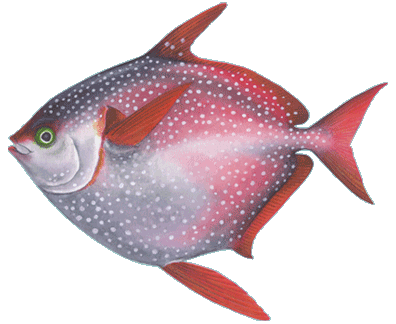
 NOPE
NOPE Good for you, MLMR....as time goes on things, things in your life will get even clearer and your quit even more empowering!?
Important Information
.thumb.jpg.e5a96502c15b934599b4a498e2701635.jpg)














Account
Navigation
Search
Configure browser push notifications
Chrome (Android)
- Tap the lock icon next to the address bar.
- Tap Permissions → Notifications.
- Adjust your preference.
Chrome (Desktop)
- Click the padlock icon in the address bar.
- Select Site settings.
- Find Notifications and adjust your preference.
Safari (iOS 16.4+)
- Ensure the site is installed via Add to Home Screen.
- Open Settings App → Notifications.
- Find your app name and adjust your preference.
Safari (macOS)
- Go to Safari → Preferences.
- Click the Websites tab.
- Select Notifications in the sidebar.
- Find this website and adjust your preference.
Edge (Android)
- Tap the lock icon next to the address bar.
- Tap Permissions.
- Find Notifications and adjust your preference.
Edge (Desktop)
- Click the padlock icon in the address bar.
- Click Permissions for this site.
- Find Notifications and adjust your preference.
Firefox (Android)
- Go to Settings → Site permissions.
- Tap Notifications.
- Find this site in the list and adjust your preference.
Firefox (Desktop)
- Open Firefox Settings.
- Search for Notifications.
- Find this site in the list and adjust your preference.