




Reciprocity
Members
-
Joined
-
Last visited
Everything posted by Reciprocity
-
-
I just remember how gross they were and how I was always embarrassed to go into one because it was all glassed in with a huge suction thing trying to suck all the smoke out of the cubicle. Good God!!! What were we thinking? Power of addiction I suppose and that always got a work out when flying. The fear of not being able to light up for hours 😵💫 Freedom tastes a whole lot better than a smoke ever did
-
OMG! Do they still have those in some airports 🤢 I remember going into one of those somewhere many years ago when I was still a smoker and even then, they were unbearable!!
-
Welcome to the Train @Asphodelian! You've hit the nail on the head with your thoughts on what quitting the smokes will do for you in terms of your life. Think of it as Freedom! Don't be too concerned about how you'll adjust to life without smokes, you will do that just as we all did. We all used smoking as an excuse at times not to get involved with our lives but I can assure you, life is GREAT without the smokes 🥳🎉 Don't fear it; embrace the opportunity. You'll be forever grateful you did Quitting is much about mindset. Focus on the positives ahead and leave the smokey past behind! You CAN do it 🙌
-
-
Nope! Pictou; Nova Scotia,Canada

-
-
-
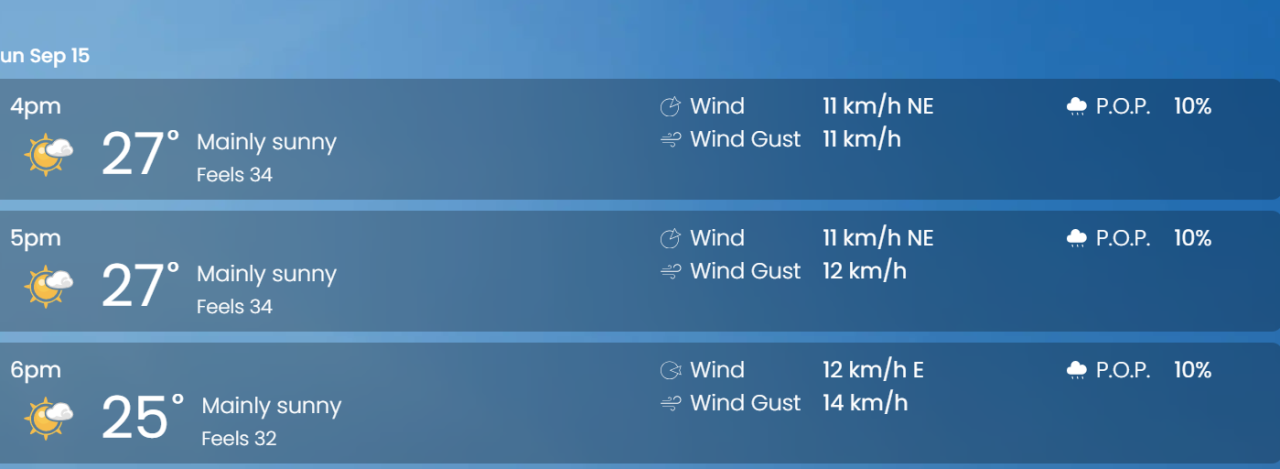
Really Hot & Humid this past week here: Today's weather: (feels like 93F with the humidity factored in)
-
I've actually been through there several times travelling down to New Brunswick to visit my parents in years gone by. I believe it's at the top of Lake Champlain, if I'm not mistaken 🤔 Champ ... Lake Champlain Monster - lol

-
Nope! American Side of Niagara Falls
 As all have said before me; you CAN do it! The early days are hard for most of us ... really hard but I can tell you for sure, quitting never killed anyone whereas the alternative; well, you get the idea. Even better than improving your health is being free of having to do what your nico-addict brain tells you to do 24/7. Just thing of how great it will be when you don't have to leave a party or any other function just because you feel you have to go for a smoke. That never happens again once you quit. So many other fabulous improvements to your life are just around the corner. Give it your all @I can do it!!!!
 Nope!
Nope! WOW! 8 Years Quit? Huge congrats @garry mhudson
 Nope!
Nope!






Important Information
Account
Navigation
Search
Configure browser push notifications
Chrome (Android)
- Tap the lock icon next to the address bar.
- Tap Permissions → Notifications.
- Adjust your preference.
Chrome (Desktop)
- Click the padlock icon in the address bar.
- Select Site settings.
- Find Notifications and adjust your preference.
Safari (iOS 16.4+)
- Ensure the site is installed via Add to Home Screen.
- Open Settings App → Notifications.
- Find your app name and adjust your preference.
Safari (macOS)
- Go to Safari → Preferences.
- Click the Websites tab.
- Select Notifications in the sidebar.
- Find this website and adjust your preference.
Edge (Android)
- Tap the lock icon next to the address bar.
- Tap Permissions.
- Find Notifications and adjust your preference.
Edge (Desktop)
- Click the padlock icon in the address bar.
- Click Permissions for this site.
- Find Notifications and adjust your preference.
Firefox (Android)
- Go to Settings → Site permissions.
- Tap Notifications.
- Find this site in the list and adjust your preference.
Firefox (Desktop)
- Open Firefox Settings.
- Search for Notifications.
- Find this site in the list and adjust your preference.