Skip to content
View in the app

A better way to browse. Learn more.

Quit Train, A Quit Smoking Support Community

A full-screen app on your home screen with push notifications, badges and more.

To install this app on iOS and iPadOS
  1. Tap the Share icon in Safari
  2. Scroll the menu and tap Add to Home Screen.
  3. Tap Add in the top-right corner.
To install this app on Android
  1. Tap the 3-dot menu (⋮) in the top-right corner of the browser.
  2. Tap Add to Home screen or Install app.
  3. Confirm by tapping Install.

All Activity

This stream auto-updates

  1. Past hour

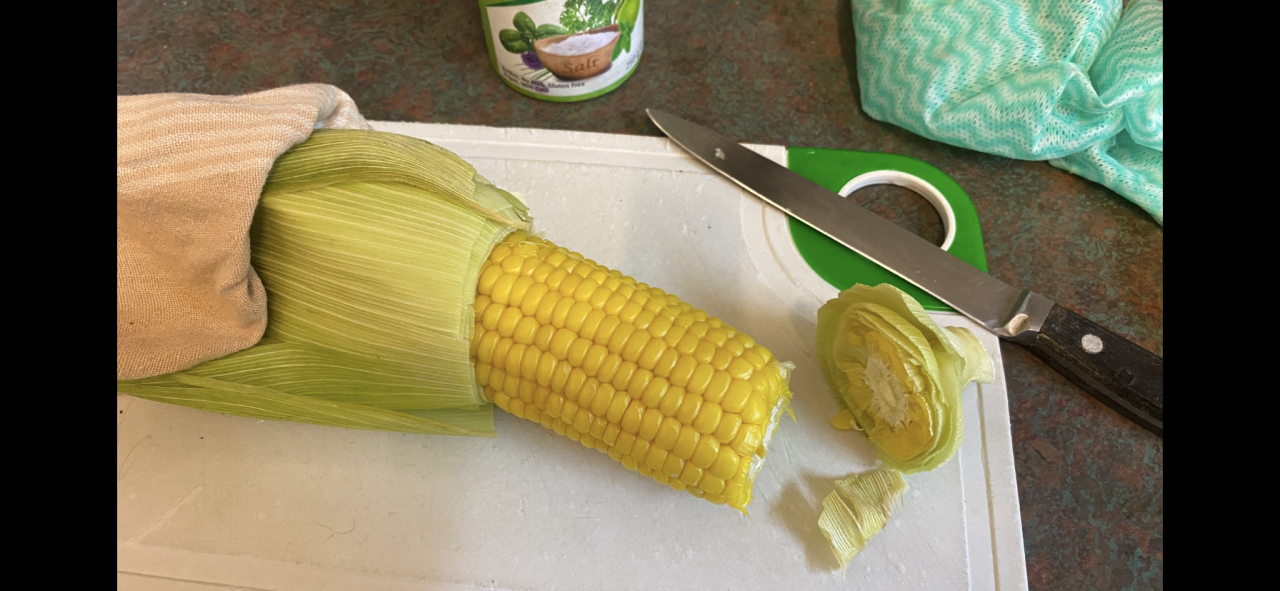
  2. Corn on the cob How many ways to prepare the humble corn cob. Boiled in salt water, on the grates of a grill, in the ash’s of the fire. My every day go to is the microwave. Husk on into the microwave high 5 mins. Remove with a t towel, it’s hot. Chop of the stalk end with a heavy knife. Squeeze. The corn will pop out of the husk cleanly leaving the silk behind. Best thing isits got that earthy flavour you get from being cooked in the husk.
  3. Today

  4. 12
  5. G’day NOPE .....Not One Puff Ever.
  6. Legs 11
  7. I am not going to smoke today. NOPE.
  8. Yesterday

  9. N.O.P.E. 🙏
  10. Gday Well … teenager at last well done

Account

Navigation

Search

Search

Configure browser push notifications

Chrome (Android)
  1. Tap the lock icon next to the address bar.
  2. Tap Permissions → Notifications.
  3. Adjust your preference.
Chrome (Desktop)
  1. Click the padlock icon in the address bar.
  2. Select Site settings.
  3. Find Notifications and adjust your preference.