



SD2026
Members
-
Joined
-
Last visited
Everything posted by SD2026
-
-
-
-
I didn't think I knew the band but realised I do as I came across this beauty! 😊 @BAT
-
Tasmanian devil (the only image I could find without it baring it's teeth)

-
You've reminded me of my fav songs from Peter Gabriel @johnny5
-
-
-
NOPE! 💫 Happy Birthday @catlover, enjoy your special day!

-
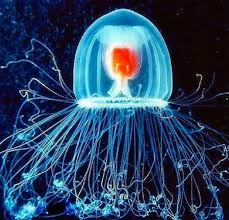
Even starting with gentle exercise will be a huge help @Keith 💪Nope! 💯NOPE! 💫Immortal jellyfish (it's real 😁)









Important Information
Account
Navigation
Search
Configure browser push notifications
Chrome (Android)
- Tap the lock icon next to the address bar.
- Tap Permissions → Notifications.
- Adjust your preference.
Chrome (Desktop)
- Click the padlock icon in the address bar.
- Select Site settings.
- Find Notifications and adjust your preference.
Safari (iOS 16.4+)
- Ensure the site is installed via Add to Home Screen.
- Open Settings App → Notifications.
- Find your app name and adjust your preference.
Safari (macOS)
- Go to Safari → Preferences.
- Click the Websites tab.
- Select Notifications in the sidebar.
- Find this website and adjust your preference.
Edge (Android)
- Tap the lock icon next to the address bar.
- Tap Permissions.
- Find Notifications and adjust your preference.
Edge (Desktop)
- Click the padlock icon in the address bar.
- Click Permissions for this site.
- Find Notifications and adjust your preference.
Firefox (Android)
- Go to Settings → Site permissions.
- Tap Notifications.
- Find this site in the list and adjust your preference.
Firefox (Desktop)
- Open Firefox Settings.
- Search for Notifications.
- Find this site in the list and adjust your preference.